|
|
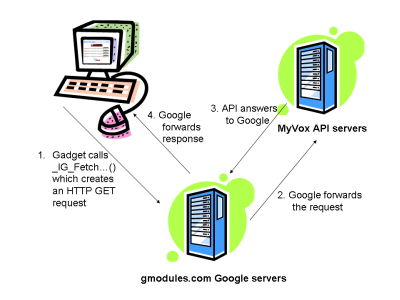
3. How to call MyVox commands from the Google Gadget API?The Google Gadget API offers a set of functions designed to work with remote content. These functions are prefixed with _IG_Fetch. More detail on these commands is available here: http://code.google.com/apis/gadgets/docs/remote-content.html. These commands allow the sending of an HTTP GET requests which are proxied through Google, avoiding the cross-domain scripting browser limitation. Most browsers do not allow Javascript XMLHttpRequest to retrieve data from domains other than where the script was downloaded from. As an iGoogle gadget is rendered and served from the gmodules.com Google servers, XMLHttpRequest requests can only go back to gmodules.com. In order to allow gadget developers to efficiently work with remote content and web services, the Google Gadget API provides a content proxy server that can be used to fetch data from web servers of any domain, working around this browser security restriction. As our Voice Memo gadget is served from gmodules.com, we will use the iGoogle _IG_Fetch API functions to call the MyVox API hosted on myvox.com.
The _IG_Fetch commands return cached content from the Google servers by default. While interacting with the MyVox API, we want to ensure our queries actually go out and return the data from the MyVox server, not an older response from a cache. An optional parameter “refreshInterval” can be set to 0 to disable the caching. Unfortunately, if the Google fetch systems are getting overwhelmed with requests, setting refreshInterval to 0 might not be sufficient. Just for safety, we suggest adding a random number as URL parameter to make each query unique, therefore not cacheable. The command the most suitable to interact with the MyVox API is the _IG_FetchXmlContent(). The parameters to this function are the URL of the HTTP GET query, the function to call when the requests data is received, and the caching duration which we set to 0. The following code sample illustrates how a call to the MyVox API can be implemented with the Google Gadget API: _IG_FetchXmlContent( 'http://api.myvox.com/vr?action=GetRecording&' + 'voice_recorder_key=YOURKEY&recording_list_key=RECLISTKEY&' + 'random=' + Math.random(), function(response) { // Do something useful with the data here alert('Received a response from MyVox'); }, {refreshInterval: 0}); The response from the request will be a DOM object that you can traverse using the standard DOM Javascript functions. To simplify our code, we will create a myVox namespace in which we will define a local API for our sample application. var myVox = function() { // We are in the myVox namespace here }(); In this name space, we will store 3 variables specific to accessing MyVox: our recorder key, our recording list key, and our password for the recording list key modification operations. We will define as well a wrapper around _IG_FetchXmlContent() which will take care of the caching disabling and the response content check. var myVox = function() { // Creating a myVox namespace // Private members var m_recoder_key; var m_recording_list_key; var m_password; function p_fetchXml(url, callback) { // Add a random parameter at the end of the URL to ensure // that Google does not give us some cached content url += '&random=' + Math.random(); _IG_FetchXmlContent(url, function(response) { if((response == null) || (typeof(response) != "object") || (response.firstChild == null)) { // Nothing we can do from this point... } else { callback(response); } return; }, {refreshInterval: 0}); }; } (); Finally, we will create a public member function to initialize our local API local variables, and a public member function for each command we want to implement. We will add one last public member function to handle the extraction of a value by element name in the XML response. ////////////////////////////////////////////////////////////////////////// // Minimal MyVox Google Gadget API by LjmSite // // Note: This API does not expose all the capabilities of the MyVox API // but only focuses on the needs of the Voice Memo application. ////////////////////////////////////////////////////////////////////////// var myVox = function() { // Creating a myVox namespace // Private members var m_recoder_key; var m_recording_list_key; var m_password;
function p_fetchXml(url, callback) { // Add a random parameter at the end of the URL to ensure that Google // does not give us some cached content url += '&random=' + Math.random(); _IG_FetchXmlContent(url, function(response) { if((response == null) || (typeof(response) != "object") || (response.firstChild == null)) { // Nothing we can do from this point... } else { callback(response); } return; }, {refreshInterval: 0}); }; // Public member methods return { ////////////////////////////////////////////////////////////////////// // Initialize the parameters required for the API ////////////////////////////////////////////////////////////////////// initAPI : function(recorder_key, recording_list_key, password) { m_recorder_key = recorder_key; m_recording_list_key = recording_list_key; m_password = password; }, ////////////////////////////////////////////////////////////////////// // Adds a new recording placeholder to a RecordingList instance and // updates the sequence numbers of any others to keep them consecutive // Important fields available in response: recording_key ////////////////////////////////////////////////////////////////////// createRecording : function(name, callback) { p_fetchXml('http://api.myvox.com/vr?action=CreateRecording' + '&voice_recorder_key=' + _esc(m_recorder_key) + '&recording_list_key=' + _esc(m_recording_list_key) + '&password=' + _esc(m_password) + '&name=' + _esc(name), callback); },
////////////////////////////////////////////////////////////////////// // Creates a new RecordingList containing one or more recording // placeholders within a VoiceRecorder application instance. ////////////////////////////////////////////////////////////////////// createRecordingList : function(name, password, callback) { p_fetchXml('http://api.myvox.com/vr?action=CreateRecordingList' + '&voice_recorder_key=' + _esc(m_recorder_key) + '&update_password=' + _esc(password) + '&delete_password=' + _esc(password) + '&name=' + _esc(name), callback); }, ////////////////////////////////////////////////////////////////////// // Deletes a single recording from a RecordingList instance and updates // the sequence numbers of any others to keep them consecutive. ////////////////////////////////////////////////////////////////////// deleteRecording : function(recording_key, callback) { p_fetchXml('http://api.myvox.com/vr?action=DeleteRecording' + '&voice_recorder_key=' + _esc(m_recorder_key) + '&recording_list_key=' + _esc(m_recording_list_key) + '&password=' + _esc(m_password) + '&recording_key=' + _esc(recording_key), callback); },
////////////////////////////////////////////////////////////////////// // Returns data for a Recording instance associated with a // RecordingList instance ////////////////////////////////////////////////////////////////////// getRecording : function(callback) { p_fetchXml('http://api.myvox.com/vr?action=GetRecording' + '&voice_recorder_key=' + _esc(m_recorder_key) + '&recording_list_key=' + _esc(m_recording_list_key), callback); },
////////////////////////////////////////////////////////////////////// // Returns data for a RecordingList instance within the VoiceRecorder // application instance ////////////////////////////////////////////////////////////////////// getRecordingList : function(callback) { p_fetchXml('http://api.myvox.com/vr?action=GetRecordingList' + '&voice_recorder_key=' + _esc(m_recorder_key) + '&recording_list_key=' + _esc(m_recording_list_key), callback); },
////////////////////////////////////////////////////////////////////// // Returns the status of the current recording session. ////////////////////////////////////////////////////////////////////// getSessionStatus : function(recording_session_key, callback) { p_fetchXml('http://api.myvox.com/vr?action=GetSessionStatus' + '&recording_session_key=' + _esc(recording_session_key), callback); },
////////////////////////////////////////////////////////////////////// // Initiate a recording session to voice the recordings in a // RecordingList over the phone. // Important fields available in response: phone_number, ivr_pin ////////////////////////////////////////////////////////////////////// startRecordingSession : function(recording_key, callback) { p_fetchXml('http://api.myvox.com/vr?action=StartRecordingSession' + '&voice_recorder_key=' + _esc(m_recorder_key) + '&recording_list_key=' + _esc(m_recording_list_key) + '&password=' + _esc(m_password) + '&recording_keys=' + _esc(recording_key), callback); },
////////////////////////////////////////////////////////////////////// // Get the value of a unique node ////////////////////////////////////////////////////////////////////// getValueByTagName : function(response, tagName) { if(response && response.getElementsByTagName(tagName) && response.getElementsByTagName(tagName).item(0) && response.getElementsByTagName(tagName).item(0).firstChild) { return response.getElementsByTagName(tagName).item(0).firstChild.nodeValue; } return ''; } }; }(); Next, 4. Creating a new recording list |